Armored Face-Off: Two-Player Strategy

Armored Face-Off: Two-Player Strategy

Lance Core Creations
2026-07-21
Tactical Strategy Local Multiplayer

Reviews

Armored Face-Off succeeds in making local competition accessible and engaging. The three modes offer variety without overwhelming the player. The elimination mode is pure adrenaline, while capture the flag adds a welcome strategic layer. The terrain on each map forces players to think about positioning, not just aim. Sharing a keyboard creates a unique social dynamic that online games lack. It is a polished, free experience that delivers exactly what it promises: quick, fun, face-to-face tank duels.

About This Game

Core Concept & Setup

Armored Face-Off is designed for two players sharing a single desktop computer. Each player controls a tank on a shared battlefield, using the keyboard to move and act. The game emphasizes direct competition, requiring quick thinking and precise control. It runs entirely in a browser, so there is no software to install. This makes it easy to start a match at any time, whether during a break or a dedicated gaming session.

Game Modes & Objectives

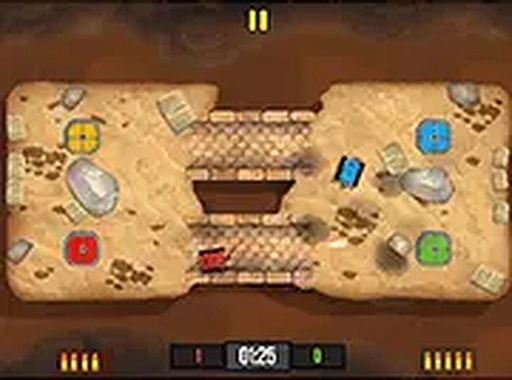
The game offers three distinct ways to play. In the elimination mode, each player tries to be the last tank standing. The capture the flag mode adds a layer of strategy, as players must seize an object from the opponent's side and return it to their own. The timed score mode shifts the focus to accumulating points within a set period. Each mode encourages a different approach, from aggressive pursuit to careful planning.

Terrain & Tactical Depth

Maps feature varied terrain with obstacles that can be used for cover. Players must navigate these environments to gain a positional advantage. Understanding the layout is key, as it allows for ambushes and defensive plays. The terrain adds a layer of tactical depth beyond simple shooting, rewarding players who learn to use the environment effectively.

Controls & Accessibility

Two players share a single keyboard. One player uses the WASD keys for movement and a nearby key for actions, while the other uses the arrow keys and a separate action key. The controls are straightforward, allowing new players to join quickly. Mastering the combination of movement and precise timing, however, takes practice. The game is optimized for desktop use and a keyboard, ensuring responsive input.

Competitive Atmosphere

The game is built for face-to-face competition. It creates a setting where friends can challenge each other directly, without the need for an internet connection or separate devices. The quick match setup and variety of modes keep the experience engaging. This local focus makes it a good choice for social gatherings or casual rivalry.

Compatibility

๐Ÿ’ป Desktop | ๐Ÿ“ฑ Mobile | ๐Ÿ“Ÿ Tablet
โ€“ All supported ยท Best with Chrome or Safari

FAQ

Does Armored Face-Off require any special hardware to play?
No special hardware is needed. The game runs in a standard web browser on a desktop computer. Two players share a single keyboard, which is the only controller required. A mouse is not needed during gameplay.
Can I play Armored Face-Off alone against a computer opponent?
Based on the available information, the game is designed for two human players on the same device. There is no indication of a single-player mode or AI opponent. It is strictly a local multiplayer experience.
How long does a typical match in Armored Face-Off last?
Match length depends on the mode and player skill. Elimination rounds can be quick, often lasting a few minutes. Timed score mode has a set limit, while capture the flag can vary. The game is designed for short, intense sessions.
Is there any way to customize the controls in Armored Face-Off?
The available information does not specify control customization. Players use the standard WASD and arrow key setups. It is likely that the controls are fixed to ensure a balanced experience for both players on the same keyboard.
Does Armored Face-Off save game progress or statistics?
As a browser-based game with no download, it likely does not save persistent statistics or progress. Each match is a standalone session. This design keeps the game lightweight and easy to start without accounts or logins.
What happens if a player accidentally presses the wrong key during a match?
Since both players share a keyboard, pressing the wrong key can cause unintended actions. The game relies on clear key separation. Players should be mindful of their key zones. Practice helps avoid confusion during intense moments.

Comments

0 comments
U
User
★ ★ ★ ★ ★
Loading comments...